
Enterprise Software
Digital Maze ERP & Operations Platform
An integrated operations platform connecting CRM, sales, finance, procurement, inventory, HR, projects, support and website publishing in one secure ERP.
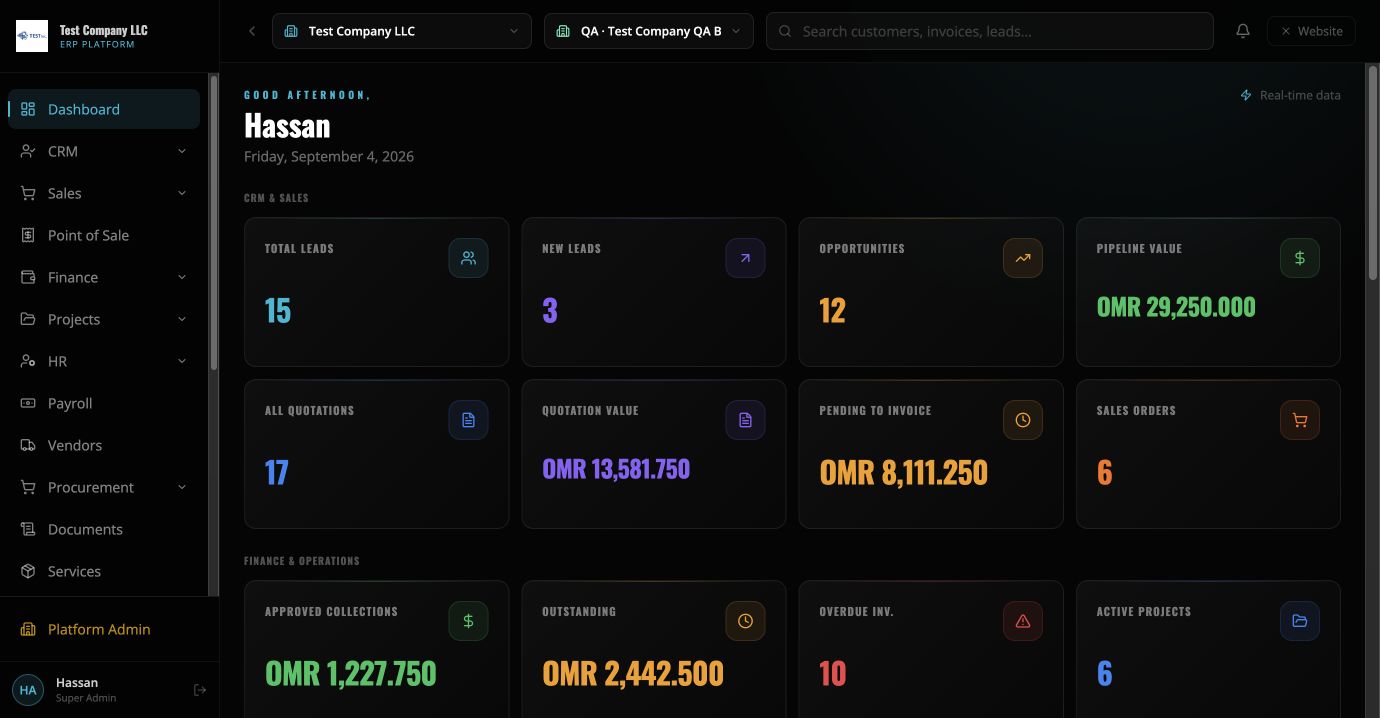
Project overview
Digital Maze designed and built its own unified ERP and operations platform to replace fragmented administration with one real-time system. The platform combines customer relationships, quotations, invoices, payments, accounting, procurement, inventory, HR self-service, payroll, project delivery, support, documents and website content management. The system uses self-hosted Convex and a VPS-hosted website with responsive interfaces for desktop and mobile, granular role-based permissions, audit trails, production backups and SEO-ready website publishing.
The challenge
Operational information was distributed across separate workflows, making it harder to see a complete picture of customers, finance, delivery, purchasing and internal administration. The business needed a secure platform that could grow without adding duplicate data entry or disconnected reporting.
Our solution
We built a modular ERP around a shared data model and permission system. Core records flow through connected stages, approved business events create accounting entries automatically, teams see only the modules their roles permit, and the website content studio publishes blogs and completed projects from the same operational platform.
Outcomes
- One source of truth across core operations
- Real-time management dashboards and audit trails
- Connected sales, invoicing, payments and accounting
- Structured procurement, inventory and HR workflows
- SEO-ready blog and project publishing from the ERP
- Responsive access across desktop and mobile
How the Maze ERP workspace fits together
Maze ERP is Digital Maze’s own business operations product, designed around the need to keep related records in a company-controlled workspace. The project objective is to reduce disconnected data entry and make the source of an operational or financial entry easier to follow. This product story explains the implemented areas and the decisions a company should review during setup. It is not a claim of independently certified compliance, a completed audit of every scenario or a customer return-on-investment result.
Architecture and company boundaries
The public website and ERP interface use a web application supported by self-hosted Convex services and VPS hosting. Company context determines which operational records a user works with. Administrators configure users, permissions and company settings; access should be tested with both authorised and restricted accounts before go-live. An industry configuration helps a company choose the operating model it needs rather than treating all businesses as identical.
CRM, quotations and sales delivery
CRM holds leads, customers and opportunities. Sales documents include quotations, orders, invoices and payments, with record-detail pages and references to related work. The useful implementation question is how a prospect becomes an approved commercial transaction, and which information carries forward. Teams should check customer details, products or services, prices, discounts, currency and approval requirements at each stage. Conversion is not a substitute for reviewing the destination document.
Accounting, VAT and multiple currencies
Accounting provides accounts, journal entries and reports that can be examined alongside their source transactions. Company settings support VAT configuration and a base currency, while transactions can retain their currency and exchange-rate information. Companies should validate inclusive, exclusive and without-tax examples, rounding, balances and historical rates against their own requirements. Tax treatment and statutory reporting need qualified review; this product page does not claim Oman e-invoicing certification or replace professional accounting advice.
Purchasing and inventory records
Procurement connects requests, purchase orders, goods receipts, supplier bills and supplier payments. Partial receipt and backorder handling are important where a supplier delivers less than ordered. Inventory records products, warehouses and stock movements. A company should review which receipt action validates quantities and creates stock, how reversals are controlled, and whether negative inventory is permitted. Purchasing a non-stock service should not be confused with receiving a physical item into a warehouse.
POS and industry-specific consumption
POS uses terminals and sessions to organise sales, product selection, receipts and refunds. Product-based businesses need the relationship between a completed sale and stock movement. Restaurants or cafes may need a recipe or bill of materials so a menu sale consumes ingredients rather than a finished retail item. Setup should confirm warehouse mapping, receipt format, tax behaviour, payment methods and refund permissions. Demonstration screens illustrate the interface; scanner and printer compatibility should be checked with the actual devices.
Projects, tasks and operational costs
Projects bring tasks, subtasks, time records, updates and costs into the work being delivered. Material consumption is an optional workflow for projects that use inventory items; it should identify the warehouse and the project receiving the cost. Service-only work may instead rely on time and expenses. Managers should check how task progress, authorised material movements and financial records appear in project reporting, rather than assuming a task status alone proves profitability.
People, documents and approval controls
HR areas include employee information, leave, attendance and payroll-related records. Supporting attachments can be linked to ERP records, with access governed by company and user permissions. Confidential HR material requires different access from a sales document. Important actions should have understandable approval descriptions and a traceable activity history. Companies should review who may create, edit, approve, download or remove records, including whether one person may perform more than one approval stage under company policy.
Maze AI and practical reporting
Maze AI supports questions about business records and proposed actions in the workspace. A useful answer must be grounded in accessible company data; missing details should be clarified instead of invented. Changes are subject to user permissions, company policy and applicable approval controls. Reporting should be checked against source records and ledger totals using representative transactions. AI suggestions, dashboard figures and exported reports still require business review, especially where records are incomplete or a process has exceptions.
Evaluate the outcome in your own setup
The delivered outcome is a connected product workspace, not a published customer performance statistic. Start with representative customers, suppliers and items in a test setup, then follow sales, purchasing, POS and project examples through their related records. Review company settings, opening balances and user responsibilities before using live data. The Maze ERP page explains the card-free first-month trial and the next subscription step. Use the assessment when you need help deciding scope, integrations or a staged implementation.