MAZE ERPConnected by design
01
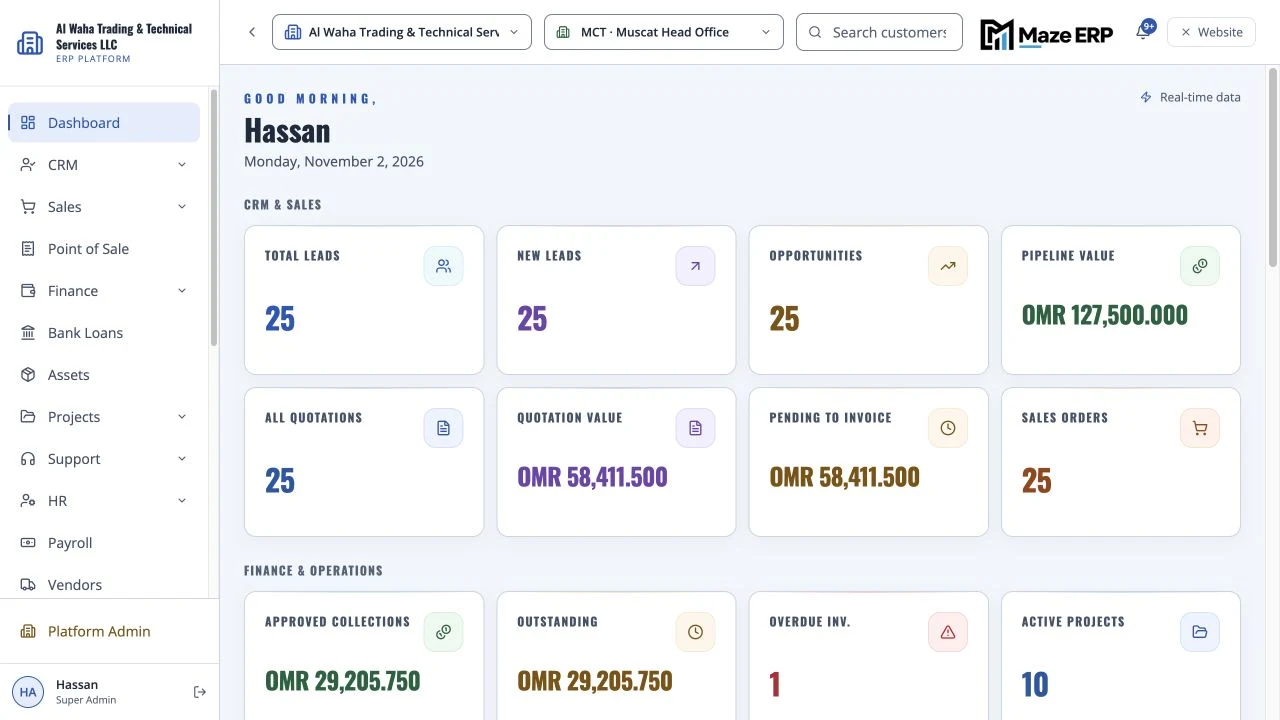
Management Dashboard
Connected sales, finance, projects and people indicators with links to their source workspaces.
Platform
From the first customer conversation to the final accounts. Bring your sales, stock, projects and people into one workspace, built for the way businesses in Oman work.
No card to start · All standard business modules
01 / LOOK INSIDE
Take a closer look at the workspace your team will use. Fresh product views captured from our demonstration company on 2 November 2026.
Sales pipeline, collections, project activity and people metrics share one management workspace.
Demonstration data, not customer results. Screens show a configured demo company; actions depend on company settings and user permissions.
EXPLORE THE CONNECTED ERP
Carry customer context from the first opportunity to collection.
Interactive illustration · Select a labelled control to explore · No live records or actions
02 / YOUR BUSINESS TOOLKIT
Start with what you need today. Your standard subscription includes the connected business modules; your administrator decides who can use them.
30 modules and workspaces
Connected sales, finance, projects and people indicators with links to their source workspaces.
PlatformCapture prospects, maintain customer records and keep commercial follow-up organized.
SalesTrack the pipeline by stage and open each opportunity to review or update its details.
SalesItemized quotations with tax selection, review stages, attachments and customer documents.
SalesConnect accepted business to fulfilment, delivery, contracts and invoicing.
SalesFollow drafts, issued invoices, balances, customer receipts and payment allocations.
FinanceChart of accounts, journals, general ledger, fiscal periods, opening balances and year-end controls.
FinanceReview bank statement transactions against recorded entries and clarify unresolved matches.
FinanceEmployee-linked expense requests, supporting attachments and approval workflows.
FinanceDocument requests and supporting files through manager and finance approval stages.
FinanceVendor bills, payments, credits, supplier returns and verified refund documents with source history.
FinanceCompany currency choices, configurable tax types and percentages, and VAT reporting.
FinanceAccounting vouchers, accruals and prepayments with recorded schedules and review controls.
FinanceLenders, contractual versions, independent review and repayment forecasts. Actual bank settlements are not automatically executed.
FinanceStandalone fixed-asset register, detail pages, revisions, QR labels and depreciation tools.
OperationsPurchase orders, goods receipts, validated quantities, backorders and item-level delivery status.
OperationsProducts, warehouses, valuation, movements, source traceability and reorder visibility.
OperationsProduct selection, branch terminals, cashier shifts, receipts and partial-refund workflows.
OperationsSupplier and service records for connected purchasing and commercial operations.
OperationsProjects, milestones, tasks, linked subtasks, materials, costs and portfolio monitoring.
OperationsRecord project work and submit it through the assigned manager's review workflow.
PeopleEmployee records, reporting lines and role-aware access to people information.
PeopleDaily attendance, leave requests, balances and manager review.
PeoplePayroll periods, employee pay records and controlled review of payroll information.
PeopleFinancial statements, aging, customer/vendor statements, stock, purchasing, sales, project and HR reports.
PlatformProtected files, record attachments and selectable branded business-document templates.
PlatformDescribed approval requests, source links, staged review and traceable changes.
PlatformOperational questions, conversational clarification and permitted preparation within company access and approval controls.
PlatformDocument emails, sending visibility and configured notifications. SMTP administration remains restricted.
PlatformBranches, roles, permissions, themes, logos, numbering, operating settings and subscription billing.
PlatformMonetary Policies is a preview workspace. E-Invoicing requires a separate readiness review; it is not a promise of statutory certification. Bank Loans currently manages terms and repayment forecasts, not automatic bank settlement. Website Content, blogs, Digital Maze projects, support, live chat, inquiries and complaints are internal Digital Maze service workspaces and are not included in self-service ERP subscriptions. Platform Admin, company groups, Customization Studio and Backup Center are platform-operator controls, not unrestricted tenant administration.
03 / CONNECT THE DOTS
Explore how records connect across your business. Select a journey, then a stage to see what each team contributes.
Capture customer context, assign responsibility and follow each opportunity through the sales stages.
04 / MAKE IT YOURS
Choose your currency, tax types, theme and branding. Give each person the access they need, with approvals and a record of important changes.
Build your workspaceCompany and branch context, warehouse controls and POS access keep daily work in the right place.
Roles, approval stages, audit history and source documents keep responsibility visible.
Ask operational questions and prepare permitted actions. Sensitive changes follow your access and approval policy.
05 / START WITH A FREE MONTH
Try Maze ERP for one month with no card required. Before the trial ends, review the users you want to keep and pay through secure checkout.
Enter your company and authorized owner details.
Continue straight into guided company setup.
Choose permissions, branding, currency and taxes.
After your free first month. Billed monthly.
Estimate excludes applicable tax. Checkout confirms the amount and OMR payment conversion. No automatic charge at trial signup. Monthly and yearly pricing shown without an assumed annual discount.
BEFORE YOU START
Yes. Maze ERP is developed by Digital Maze for Oman businesses, connecting commercial operations with company-specific currencies, tax types, branches, permissions and approvals.
No. Register, verify your email and complete setup without entering a card. Before the trial ends, use the payment button in ERP or your reminder email to continue through Paymob checkout.
Yes. Your company administrator reviews the users to retain for renewal. Users not selected do not retain paid access; checkout and billing show the selected seat count.
ERP and email reminders guide you to payment. After the trial or subscription expires, the seven-day payment grace period applies. If payment is still outstanding, access is suspended. Paying later can restore eligible renewed accounts and users.
Yes. Authorized company administrators can change themes, branding and operating settings, and manage users, permissions and POS configuration within their company access.
Contact Digital Maze to review your source data, required fields, opening balances and migration scope. Migration services and specialist configurations are assessed separately and require validation of the actual records.
Meet your next business workspace.